
Espial · Utility line

Your device health, readable at a glance.

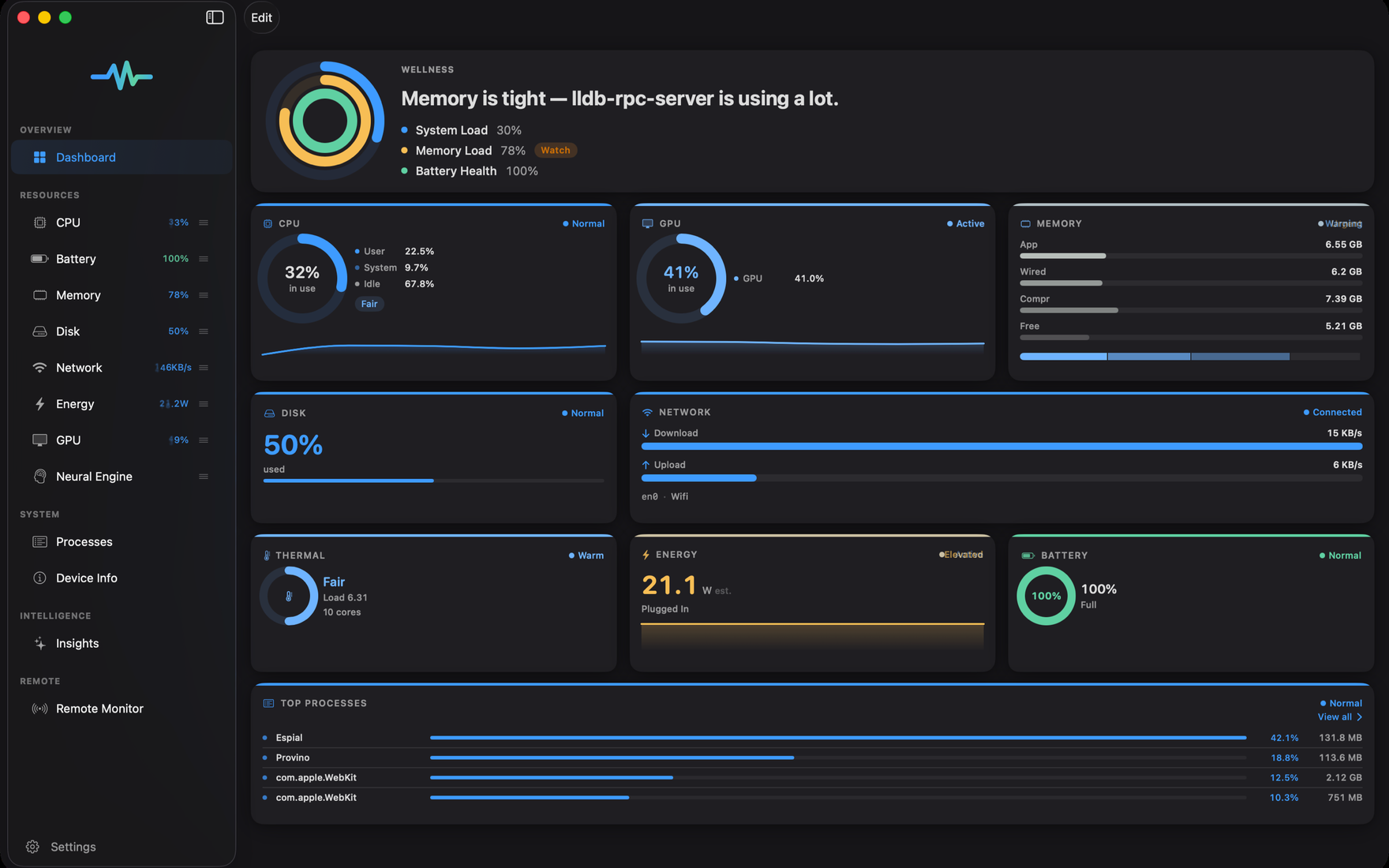
Espial turns live system stats into a beautiful, native workspace: CPU, memory, disk, battery, network, energy, processes, and remote devices — with a Mac menu bar extra that keeps health one glance away, and plain-language insights.

In development MaciPadiPhone
Espial on Mac: a live device-health dashboard with CPU and memory gauges, a network graph, battery, and an insight Espial on Mac: a live device-health dashboard with CPU and memory gauges, a network graph, battery, and an insight
Espial on iPhone: a device wellness summary with CPU, memory, battery, and storage Espial on iPhone: a device wellness summary with CPU, memory, battery, and storage

Screenshots

A closer look at Espial.

A customizable dashboard, remote monitoring, and Mac-only process control. Scroll through a few views — toggle the theme to see light and dark.

Core experience

Live stats without visual noise.

A customizable dashboard, native detail views, one-second sampling, sparklines, and readable health interpretation.

CPU, GPU & Neural Engine

Live load, per-core activity, graphics utilization, and Neural Engine availability where the platform exposes it.

Memory & disk pressure

Used, wired, and compressed memory, swap, disk capacity, and free space in views designed for quick scanning.

Network & battery

Transfer rates, connection type, battery level, charging state, health, cycles, and system power where available.

Processes on Mac

Review top processes and resource usage on your Mac, with direct process controls in the non-App-Store distribution path.

On-device insights

Espial summarizes device health in plain English and flags sustained issues — without sending snapshots to an external service.

Remote monitor

With Sign in with Apple and iCloud, watch your own devices from another device with live health tiles.

Dashboard
Dashboard
9
resizable tile families
Refresh
1s
single coordinator timer
History
Insight
Healthy headroom. Memory is the most constrained resource, but pressure remains normal.

Custom dashboard

Arrange the device story your way.

Espial’s dashboard supports tile sizes and variants: rings, bars, sparklines, stats grids, dual network columns, health views, and compact minimal tiles.

  • Drag-to-reorder: put the metrics you care about first.
  • Style variants: dense stats, quiet gauges, or trend-forward charts.
  • One-anchor theming: Utility, Server, and Consumer themes stay coherent across every tile.

Remote monitor

Your own devices, seen from the one in front of you.

Espial’s remote monitor uses Sign in with Apple and iCloud so a Mac, iPad, or iPhone can publish a lightweight health snapshot for your other signed-in devices.

  • Short-lived snapshots: CPU, memory, disk, battery, thermal, network, and optional GPU.
  • Live mode: faster publishing when a peer device is actively watching.
  • User control: enable, disable, block, or remove devices from the remote list.
Remote
Studio Mac CPU
28%
Travel iPad battery
74%
Thermal
NominalLive
Updated just now
Download
3.4
MB/s

Platform reality

Honest about what each device allows.

Espial is native everywhere, but iPhone and iPad are intentionally sandboxed. The app reflects that rather than pretending a phone can read every system-wide stat.

CapabilityMaciPadiPhone
System-wide CPU and memoryYesOwn processOwn process
Process list and terminationYesNoNo
Disk capacity and free spaceYesYesYes
Battery, thermal, reachabilityYesYesYes
GPU utilizationYesNo public APINo public API
Plain-language insightsYesYesYes

Launching soon

Get Espial the day it ships.

Leave your email and we’ll let you know at launch — plus early access to the TestFlight beta when it opens.

We’ll only email you about Espial and Simple Modern Software. Unsubscribe anytime.